Outcome first
Work from a visible plan, not a disappearing prompt.
Describe what done looks like. Keep steps, task state, tool activity, and the result connected.
Local-first // Windows + Linux // Apache-2.0
Plan the outcome, bring your own model, connect the tools you need, and keep important actions visible. A local-first alternative for people who want more control than a closed AI workspace can offer.
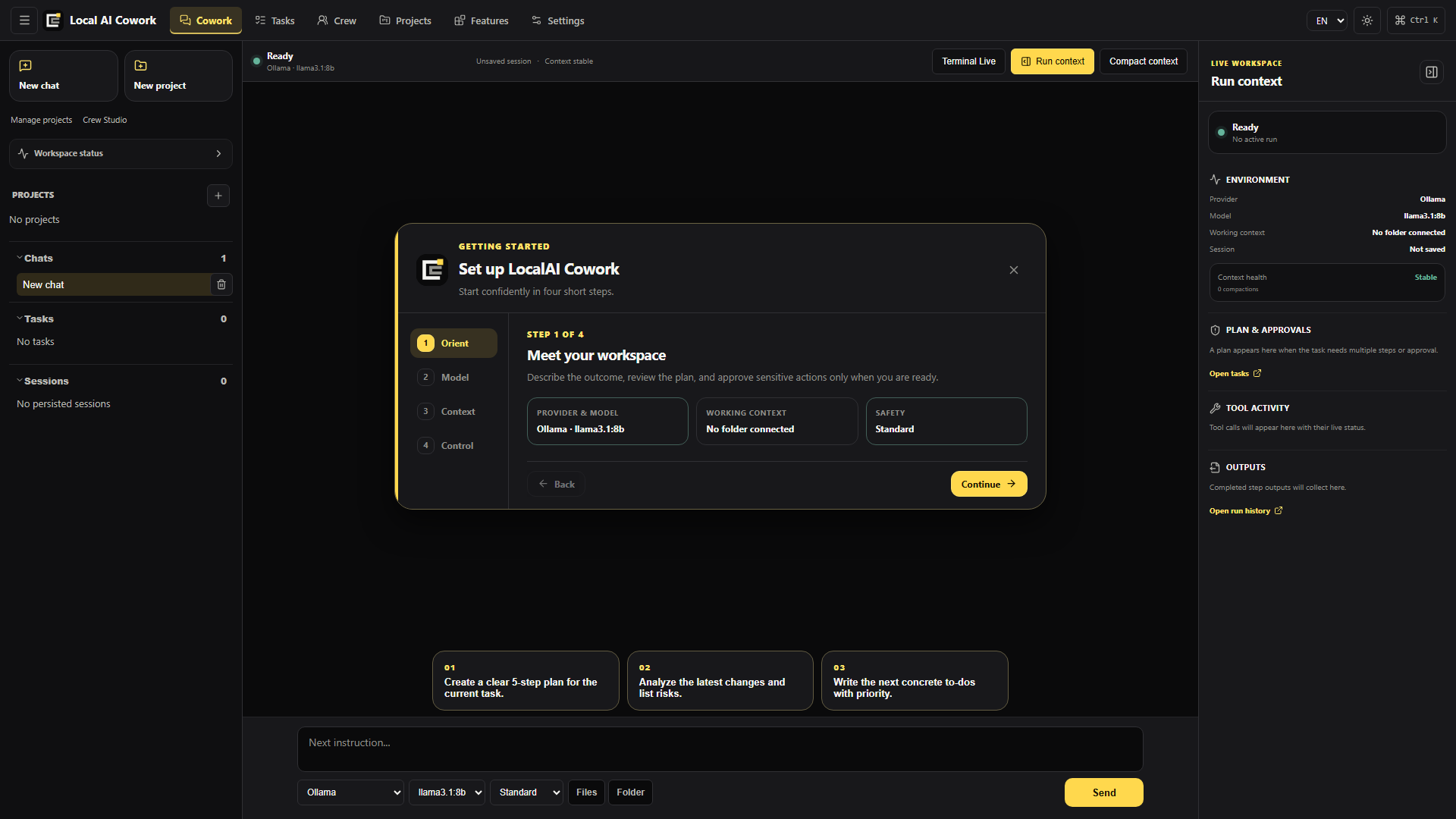
01 // The workspace
LocalAI Cowork keeps the objective, context, execution, and review surface together—so the work remains understandable while it moves.
Outcome first
Describe what done looks like. Keep steps, task state, tool activity, and the result connected.
Model choice
Run locally with Ollama or configure a compatible hosted endpoint when a task needs it.
Selected context
Choose the folders, documents, and project instructions that belong to the current objective.
Real tools
Use MCP servers, local tools, terminal workflows, skills, and reusable pipelines without hiding what is happening.
02 // The working loop
A simple loop turns a request into controlled work and a result you can inspect before it leaves your desk.
Define the result, project, model, and relevant context.
Follow the plan, tool calls, progress, and generated artifacts.
Keep sensitive actions behind explicit rules and approval points.
Turn repeatable instructions into skills, templates, and pipelines.
03 // Optional distributed mode
Self-host one Linux control plane when work must continue in the background. The desktop remains fully standalone and private files stay local unless you explicitly create a remote snapshot.
Keep projects, Ollama or vLLM endpoints, native tools and durable local Runs on your own Windows or Linux device.
Caddy, Rust services, PostgreSQL, encrypted object storage and hardened Linux sandboxes run behind one proxy port.
Follow events, answer questions, approve actions, upload attachments and take over authenticated GUI sessions.
Dedicated outbound-only Windows executors add installed Word, Excel, PowerPoint and Windows desktop automation.
The distributed stack has extensive automated acceptance, but physical Android, Office, identity-provider and reverse-proxy validation remains operator-specific. Review the status matrix before public multi-tenant use.
04 // Local by design
The desktop app runs on your device. You choose whether a task uses a local model or a configured remote service, and which files and tools it can reach.
Read the privacy boundaries05 // Know the trade-offs
Claude Cowork, Microsoft Copilot Cowork, and LocalAI Cowork serve different ecosystems. Compare the practical differences without pretending the products are identical.
Compare source access, local models, execution, subscriptions, and cost.
GUIDE / 02Compare a local desktop workspace with Microsoft 365 automation.
GUIDE / 03See what inspectable source changes for control and extensibility.
GUIDE / 04Evaluate LocalAI Cowork against the broader open cowork software category.
Built in public
Download the app, inspect every layer, and help shape an open-source alternative for agentic work.
06 // Before you install
LocalAI Cowork is early-stage software. These are the boundaries worth knowing before you use it for real work.
LocalAI Cowork is an open-source Windows and Linux desktop workspace for AI-assisted work. It combines chat, tasks, file context, model configuration, MCP servers, tools, approvals, and audit information in one application.
No. OpenCowork and Open Cowork are names used by other independent projects. LocalAI Cowork is separate; this OpenCowork alternative guide explains how to compare open cowork tools without mixing up product names.
No. LocalAI Cowork is an independent project and currently uses Ollama for local model execution. It is not affiliated with or endorsed by the separate LocalAI project at localai.io, Anthropic, or Microsoft.
Yes. Ollama is supported for local model execution. You can also configure OpenAI-compatible or OpenRouter endpoints when a hosted model fits the task better.
The app itself runs locally and the current release has no implemented telemetry sender. Requests leave the device only when you choose a remote model endpoint, connector, MCP server, or web-enabled tool. Those services receive the information needed for the action you requested.
Yes. The application is available under the Apache License 2.0. A remote model provider may charge for its own API usage; local Ollama use does not require a provider subscription.
Windows 10 and 11 are the most mature targets. Linux x86_64 is released as a beta-quality AppImage for broad distribution compatibility, plus native DEB and RPM packages. ARM64, musl-only systems, and Windows-specific sandbox, credential-vault, and Office features are not supported on Linux yet. See the Linux installation guide.